

Overview
user_path is a normalized hierarchy for the caller, for example
/team/alpha or /team/alpha/service.
GoModel uses it to keep model access, workflows, budgets, usage, and audit data
scoped to the right team, tenant, service, or customer.
API keys
You can bind a user path to a managed API key in the admin dashboard:API Keys -> Create API Key -> User Path
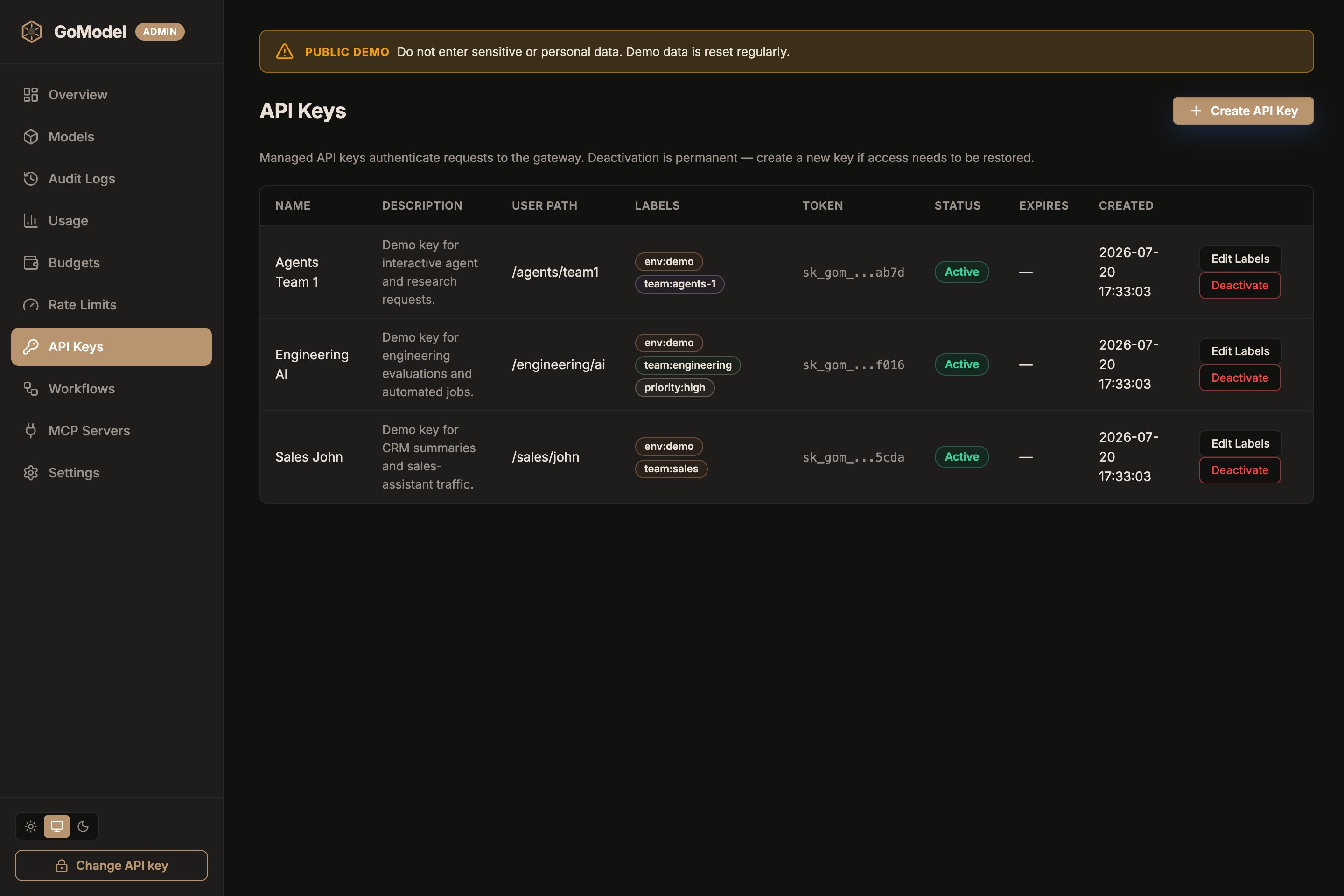
user_path alongside its
labels, so you can confirm which subtree a key resolves to at a glance.
When a request uses that key, GoModel treats the key’s user_path as the
effective user path for the request.
HTTP header
Clients can also send a user path directly:USER_PATH_HEADER or
server.user_path_header in config.yaml. If unset, GoModel uses
X-GoModel-User-Path.
If the API key has its own user_path, the key wins. GoModel overwrites the
header value with the key-bound path before workflow matching, audit logging,
usage tracking, and model access checks run.
Access scope
The key-bounduser_path is also the key’s access scope: the subtree it
may read and manage. A key bound to /team/alpha can reach /team/alpha and
every descendant, but not /team/beta, not /team, and not rows recorded
without a user path. The header never widens the scope; it only chooses the
path a request is attributed to.
The rule is the same for every credential: the user path is the node you act
as, and you can see that node and everything below it. An SSO session bound to
/users/alice therefore administers only that subtree. An extension that wants
to hand out gateway admins binds those sessions to /, and team admins to the
team root such as /team/alpha, exactly as you would create an API key at
that path.
The scope applies in two places:
- Admin API and dashboard. A key with dashboard access and a
user_pathis a scoped admin of that subtree. See Scoped admin access. - Object ownership on
/v1lifecycle endpoints, described next.
Object ownership
Responses, conversations, batches, and uploaded files remember theuser_path
they were created under. Retrieving, listing, updating, cancelling, or deleting
one of them by ID succeeds only when that path lies inside the caller’s scope;
otherwise the gateway answers 404, exactly as for an unknown ID. A
/v1/responses call that references a conversation, or a
previous_response_id, from another subtree fails the same way — including on
providers that resolve previous_response_id themselves.
Scoped credentials can only address objects the gateway tracks: an ID the
gateway has no record of is reported as missing, and GET /v1/files lists the
caller’s tracked files from the gateway’s own records rather than from the
provider. Global credentials see every object, including legacy rows recorded
before the path was stored, and still fall back to the provider for untracked
IDs. Use a persistent store so every object stays tracked across restarts.
Model access
Model access policies are enabled by default. A policy is a virtual model with no target; it can useuser_paths to limit a selector to a subtree, or be
disabled to turn the selector off entirely. Selectors can target:
/for all providers and models{provider_name}/for one configured provider{provider_name}/{model}for one model on one provider- a model ID without a provider name
- selector:
openai/gpt-5 user_paths:["/team/alpha"]
/team/alpha and its descendants, such as /team/alpha/service.
Use Models -> New virtual model in the dashboard to manage these rules: leave
Target model empty to create an access policy on the Source selector.
See Virtual Models for redirects (aliases).
The Users page answers the same question from the other side: which models
may a group, user, or API key call. Each user path node and each managed API key carries an
optional allowed_models list; lists intersect down the tree, so a child can
only narrow what its group allows. See Users.
Exposed models
GET /v1/models uses the effective user_path too.
That means two API keys can see different model lists if their user paths have
different model access rules.
Workflows
Workflows can also includescope_user_path, so different teams or services can
use different budget, cache, audit, usage, guardrail, and failover settings.
You can combine user path with provider and model scope, for example:
/team/alphaopenai_primary+/team/alphaopenai_primary+gpt-5+/team/alpha
Budgets
Budgets are also scoped byuser_path. A budget for /team/alpha applies to
/team/alpha and descendants such as /team/alpha/service, but not to sibling
paths such as /team-alpha.
See Budgets for spend limits and workflow enforcement.