

Overview
Budgets let you set spend limits for auser_path subtree, a request
label, or a provider. GoModel evaluates them from tracked usage cost
records and blocks matching requests when a limit has already been spent.
Every budget has a scope that names what it limits:
Use budgets when you want limits such as:
/team/alphacan spend$10per day/team/alphacan spend$50per week/has a global monthly limit- everything labelled
Mobile-App-iOScan spend$500per month - the
openai-prodprovider can spend$100per day, across every user
Budget enforcement runs only when budgets are globally enabled and the active
workflow has Budget enabled. The Budget workflow control is enabled by default
when the global budget feature is on.
USAGE_FLUSH_INTERVAL (5 s by default) or every 100 entries, so a budget does
not yet see the requests of the batch being collected, nor requests still
running, such as long streams. Those requests complete, and their spend counts
toward the budget once written, under the budget’s cost basis and the
non-billable provider rules. How far spend can pass
a limit depends on traffic and request length, and grows while storage writes
are slow, so leave headroom when a budget is a customer’s credit limit. Usage
entries that are never stored, because the buffer (USAGE_BUFFER_SIZE) is
full or a write fails, are logged and counted in
gomodel_usage_entries_dropped_total, and never reach a budget.
Enable budgets
Budgets are enabled by default:Create budgets
You can create budgets in the dashboard: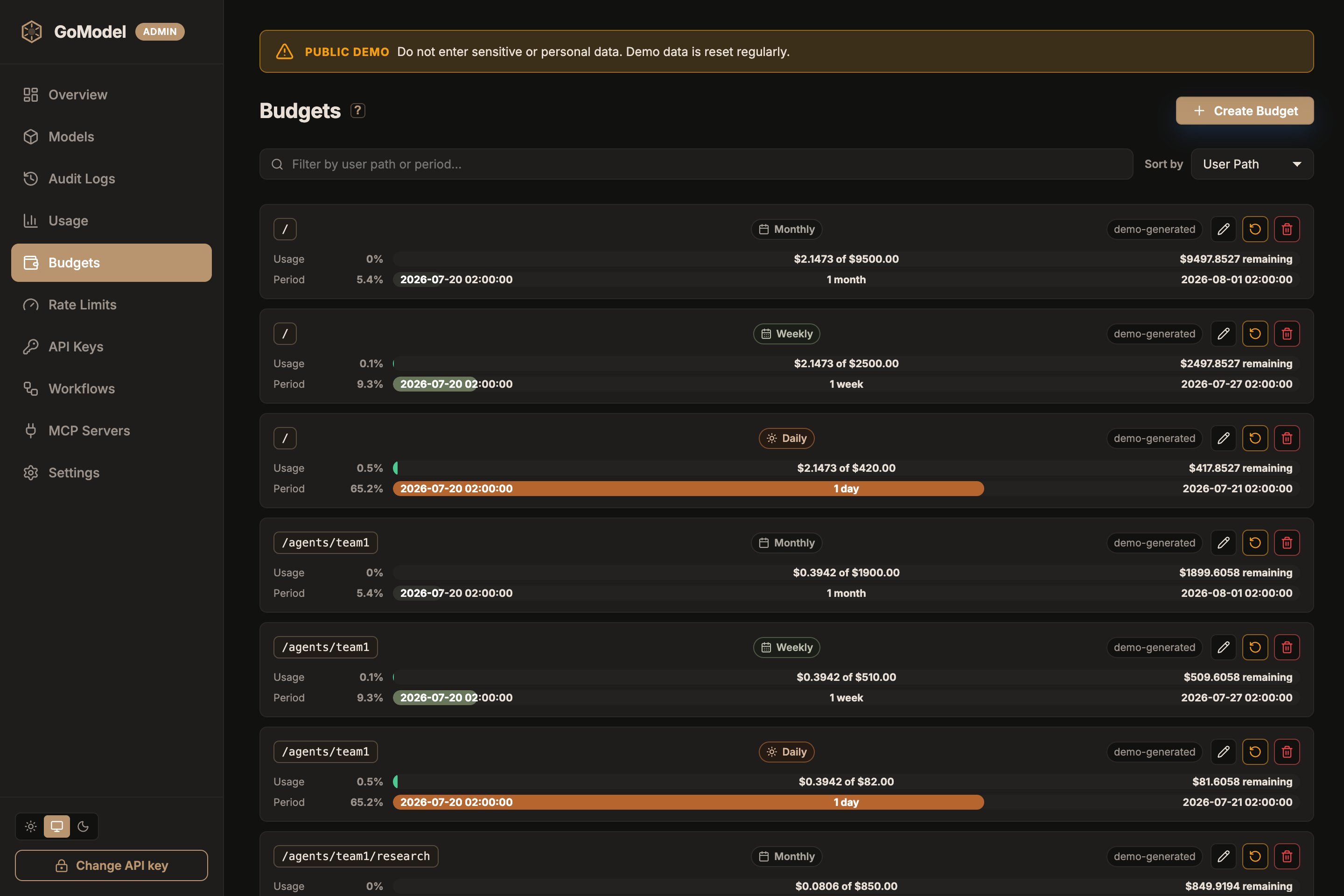
label or
provider chip next to the period. Dashboard-created budgets are marked as manual. Budgets loaded from
YAML or environment variables are marked as config.
You can also seed budgets from YAML:
SET_BUDGET_ becomes a user path. Use double underscores
(__) between path segments; single underscores remain part of a segment:
SET_BUDGET_TEAM__ALPHA->/team/alphaSET_BUDGET_USER_123->/user_123SET_BUDGET_->/
__ segment value.
Provider budgets use their own prefix, SET_PROVIDER_BUDGET_<NAME>, like
SET_PROVIDER_RATE_LIMIT_<NAME>. Underscores in the suffix become hyphens, so
SET_PROVIDER_BUDGET_OPENAI_PROD limits the openai-prod provider.
Label budgets have no environment-variable form. Labels are matched verbatim,
including their casing, and may contain characters that environment variable
names cannot express. Declare them under
budgets.labels in YAML or create
them in the dashboard or admin API.
The Seconds column is the internal period identifier. Standard periods use the
configured reset-anchor logic; for example,
monthly is stored as 2592000 but
resets on calendar month anchors and clamps the reset day to shorter months.
Only custom period_seconds values behave as fixed-second windows.
For custom windows, set period_seconds in YAML:
How matching works
Budget paths apply to the configured path and its descendants:- budget path
/team - request path
/team/app - result: budget applies
- budget path
/team - request path
/team-alpha - result: budget does not apply
-
budget label
Mobile-App-iOS -
request labels
["Mobile-App-iOS", "prod"] - result: budget applies
-
budget label
Mobile-App-iOS -
request labels
["mobile-app-ios"] - result: budget does not apply
LITELLM_TAGS_ENABLED=false when a client must not charge another team’s
label budget.
Provider budgets match the configured provider instance that serves the
request, case-insensitively. A provider budget caps that provider’s total
spend across every user path and label; it does not narrow a user-path or
label budget. Requests whose provider is not known at admission, such as batch
submissions and MCP calls, are not checked against provider budgets.
If multiple budgets match a request, GoModel checks all matching limits in one
lookup. The request is rejected if any matching limit is exhausted.
Non-billable providers
A provider configured withbillable: false serves requests whose cost the
caller does not owe you, typically a customer’s own API key registered as its
own provider instance. User-path and label budgets neither gate a request
routed to such a provider nor count its spend, on either cost basis. Provider
budgets still apply to it: on provider cost they count its usage in full,
while a billed-cost provider budget sees its billed cost of 0. Usage is
tracked and priced as usual, and each row records billable: false; the flag
is stamped when the row is written, so changing it later does not rewrite past
spend.
For example, a platform lets users bring their own OpenAI key and also offers
your hosted models. Register the user’s key as a provider of its own, mark it
non-billable, and put the budget on the user’s path: the budget then caps the
hosted models only, while the user’s OpenAI usage stays visible in usage
reports and GET /v1/usage.
/users/u123. Requests to openai-u123/... are
not checked against the budget and add nothing to it; requests to your hosted
provider are. In config.yaml the same setting is providers.<name>.billable: false, or <PROVIDER>[_SUFFIX]_BILLABLE=false in the environment; see
Cost tracking for how
non-billable usage is billed.
Provider budgets and failover
When a provider budget is exhausted and the request has failover targets, GoModel skips the exhausted provider and tries the failover targets instead of rejecting the request. Failover also skips any target whose own provider budget is exhausted. If no target is left, the client receives the originalbudget_exceeded error. User-path and label
budgets always reject: switching providers cannot relieve them.
The one exception is a request admitted on a non-billable provider, for which
user-path and label budgets were not checked. When it fails over to a billable
target, failover checks those budgets for that target and skips it if one is
exhausted, so a customer’s own key never opens a way around their budget on
your providers.
Dynamic per-child budgets
Dynamic per-child budgets are available in GoModel Pro and require the
quota_templates license entitlement. Without it, admin API writes are
rejected with 403 quota_templates_not_entitled, and per_child: true in
configuration aborts startup — GoModel never silently falls back to one
shared subtree budget, since that would change enforcement semantics.per_child: true on a user-path entry when its limit is a template for
direct children rather than one shared subtree budget. For a template on
/customers:
/customers/aliceand/customers/alice/appspend from Alice’s budget/customers/bobspends from an independent Bob budget/customersitself does not match the template because it has no child
per child template instead of
inventing an aggregate usage value. Use GET /v1/usage with a child’s effective
user path to inspect that child’s resolved budget. Resetting the template starts
a new period for all of its children.
Budgets on billed cost (GoModel Pro)
Budgets on billed cost require a GoModel Pro license with the
billing
entitlement and PRICING_MARKUPS_ENABLED=true. Without them, admin API
writes with "cost_basis": "billed" are rejected (403
billed_budgets_not_entitled, or 400 billed_budgets_markups_disabled when
markups are off), and a billed budget in the current configuration aborts
startup. A billed budget already stored (created in the dashboard, or by an
earlier configuration) never blocks startup: while the entitlement or markups
are missing, GoModel logs a warning once and enforces it on provider cost, so
the limit stays in force. It stays stored as billed: editing its amount in
the dashboard or with "cost_basis": "billed" keeps it billed, and it limits
billed cost again once the entitlement and markups are back.cost_basis: billed to limit what the caller is billed instead —
provider cost plus its markup.
Use it when a budget is a customer’s credit limit.
- sums
billed_cost, including billed response-cache hits. WithPRICING_BILL_CACHE_HITS=false, cache hits bill0and add nothing. - counts usage recorded without a billed cost (before markups were enabled) at its provider cost, so enabling markups mid-period never under-counts.
- gates response-cache hits too: while cache hits are billed, an exhausted billed user-path or label budget rejects a request before a cached response is replayed. Provider-cost budgets never count cache hits, and provider budgets do not apply to them, since a hit is not routed to a provider. A hit of a non-billable provider’s model is admitted regardless, as the request itself would be.
- on a provider, still counts the billed cache hits of that provider’s models
in its spend. Set
BUDGETS_PROVIDER_BILLED_CACHE_HITS=false(budgets.provider_billed_cache_hits) to limit only what was billed for requests the provider served.
cost_basis is provider (default) or billed. It is an attribute, not part
of the budget key: one scope, subject, and period holds one budget on either
basis, and changing the basis keeps the current period. A PUT without
cost_basis sets provider; existing budgets keep limiting provider cost.
GET /admin/budgets and GET /v1/usage report each budget’s stored
cost_basis and its enforced_cost_basis, the basis spent is measured on.
They differ only for a billed budget enforced on provider cost. In the
dashboard, the budget form shows a Cost basis selector once the
entitlement and markups are on, billed budgets carry a billed chip, and a
billed budget enforced on provider cost carries a billed · on provider cost
chip.
Workflow enforcement
The active workflow controls whether budget checks run for a request. In a workflow payload:user_path subtree. See Workflows for matching
precedence.
Response cache hits can return before budget enforcement. If a cached response
exists, GoModel can serve it without spending additional provider cost.
Reset windows
Budget reset anchors are configured in the dashboard under:31
runs on April 30 and on February 28 or 29.
Editing a budget changes the limit but does not reset the current period. Use
the row-level Reset action to start a new period for one budget, or
Settings -> Reset All Budgets to reset all budgets.
Admin API
Budget management is also available through the admin API:scope, subject,
and period; user_path is accepted as a shorthand spelling of the subject for
user-path budgets:
"scope": "provider" with a provider
name as the subject for a provider budget):