

Overview
Rate limits cap request rate, token rate, and in-flight concurrency. Every rule has a scope that decides what it protects:- User path (consumer control) — e.g.
/team/alphacan send100requests per minute, consume50,000tokens per minute, and hold10requests in flight, across everything under that path. - Provider (upstream protection) — e.g. send provider
openaiat most500requests per minute across all consumers and models, so the gateway never blows through your provider quota. - Model — e.g.
openai/gpt-4omay consume90,000tokens per minute; a bare id likegpt-4ocaps the model across every provider.
429 with an OpenAI-shaped error, an accurate Retry-After header, and
x-ratelimit-* headers — switching models would not help, the consumer is the
subject. A saturated provider or model is instead treated like an
unavailable target: virtual-model load balancing and failover route around it
while another target has capacity, and only when no viable target remains does
the client get 429.
Limits apply to every model endpoint: chat completions, responses, messages,
embeddings, audio, passthrough, realtime sessions, and batch submission.
Use rate limits for traffic control and budgets for spend control: budgets cap
dollars over hours-to-months from durable usage records, rate limits cap
request and token velocity over seconds-to-a-day with fast in-memory counters
that replicas sharing a database keep in step.
Enable rate limits
Rate limits are enabled by default and cost nothing until rules exist:max_tokens) are counted from usage records, so they require
usage tracking:
Create rate limits
In the dashboard: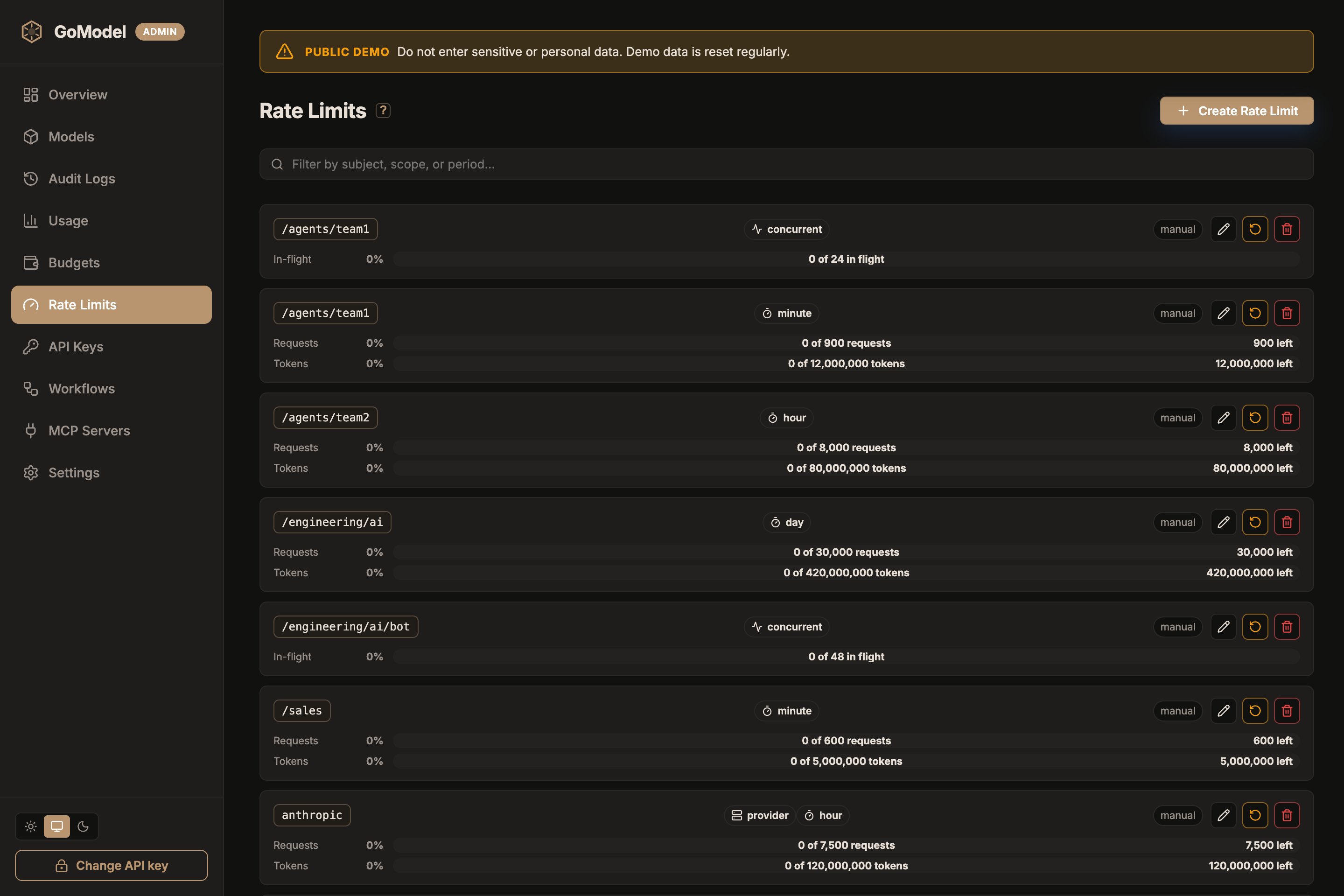
manual. Rules loaded from YAML or
environment variables are marked config and are read-only in the dashboard.
Each row shows live usage against its limit; the reset icon clears just that
rule’s counters, and the trash icon deletes the rule (which also resets it).
The Models page has a gauge button on every model row and provider header that
opens the same limits for that subject in context: the model’s own rules, the
provider rules it shares, and the global (root user-path) rules — each with
live usage — plus add and edit actions.
Editing a rule’s scope, subject, or period moves it: the rule is recreated
under the new key and its live counters restart. Editing only the caps keeps
the counters.
Seed rules from YAML:
SET_RATE_LIMIT_<PATH>
(the suffix maps to a user path exactly like SET_BUDGET_*; __ separates
path segments); provider rules use SET_PROVIDER_RATE_LIMIT_<NAME>
(underscores become hyphens, like provider-instance env vars):
rpm/tpm per minute, rph/tph per hour,
rpd/tpd per day, and concurrent for the in-flight cap. A JSON array of
rule objects is also accepted for custom windows:
Custom windows use
period_seconds directly.
How matching and counting work
Rule paths apply to the configured path and its descendants, exactly like budgets: a rule on/team matches /team/app but not /team-alpha. A rule
on / applies to all traffic.
Provider rules match the resolved provider instance by name. Model rules
match the executed model: a provider-qualified subject (openai/gpt-4o)
covers one provider’s model, a bare subject (gpt-4o) covers that model on
any provider. Matching is case-insensitive, and the rule keeps the spelling
you wrote it with — a rule on provider openai-EU is listed and reported as
openai-EU, while still matching the route however it is cased.
A rule owns one shared counter for its whole subject. A 100 rpm rule on
/team allows 100 requests per minute across everything under /team
combined; a 500 rpm rule on provider openai is shared by every consumer
and model routed there. For per-key limits, bind each managed API key to its
own user path and define rules there.
Dynamic per-child rate limits are available in GoModel Pro and require the
quota_templates license entitlement. Without it, admin API writes are
rejected with 403 quota_templates_not_entitled, and per_child: true in
configuration aborts startup — GoModel never silently falls back to one
shared subtree counter, since that would change enforcement semantics.per_child: true on a user-path entry to turn it into a dynamic template.
Each direct child then owns independent counters: with a template on
/customers, /customers/alice/app shares /customers/alice’s counter while
/customers/bob gets another. The template path /customers itself does not
match. Provider and model rules cannot be per-child.
The global admin list shows a per child template without a misleading
aggregate counter. GET /v1/usage resolves the template for the caller’s user
path and returns that child’s live counters. Resetting or deleting the template
clears all child request and token windows for that definition; active
concurrency slots release normally when their requests finish.
All matching rules are checked; the first exhausted limit rejects the request.
Provider and model limits route around saturation
A saturated provider or model behaves like one with stale inventory:- Virtual-model load balancing skips the saturated target and picks the
next available one, so an alias with several targets keeps serving. When
every target is saturated, the alias resolves to its first target anyway so
the client gets the honest
429withRetry-After(or failover takes over) rather than an unavailable-model error, and the alias stays listed in/v1/modelsthroughout. - The failover chain takes over for a saturated primary route: the primary provider is never called (it would happily serve the request and defeat the limit), the sweep over the redirect’s remaining targets starts immediately, and rate-saturated candidates are skipped along the way.
- Direct requests with no virtual model receive
429with an honestRetry-After— the same answer the provider itself would eventually give, minus the wasted upstream call. Consumer (user path) breaches always return429: switching targets cannot relieve them.
- Request windows use a sliding-window estimate, so bursts cannot double up at window boundaries.
- Token usage is counted after each response completes (streams included). One request can overshoot a token window before the counter catches up — the same behavior as other gateways that count tokens from responses.
- Response-cache hits are served before enforcement and count nothing.
- A realtime session counts as one request and holds one concurrency slot for the whole session. A batch submission counts as one request and holds no concurrency slot.
- Request and token windows live in memory for admission and are saved to
the configured store about once a second (and on shutdown), so they
survive a restart and
gomodel --reload. A restart counts the previous run’s saved counts once, not twice; a crash loses at most the counts since the last flush. Tune the interval withRATE_LIMITS_FLUSH_INTERVAL(seconds; default1).0skips the periodic write: counts still load on start and save on a clean shutdown, but replicas no longer see each other’s traffic after start. - A reset applies to every replica: the replica that serves it clears its request and token windows at once, and the others within a few seconds, when they reload the rules. Active concurrency slots stay held until their requests finish. Switching a rule between shared and per-child, or deleting and re-creating it, starts its counts from zero the same way. Stored counts from before a reset or such a change never come back, even after a restart or after switching back. Editing a limit keeps the counts. Finish a rolling upgrade from a release before per-replica snapshots before resetting or deleting rules: a reset or delete served by an older replica can come back after a restart.
Several replicas share one limit
With a nonzeroRATE_LIMITS_FLUSH_INTERVAL (the default is 1), replicas
that share a database enforce each rule together: a 100 rpm rule
admits about 100 requests per minute across all of them, not 100 per
replica. Each replica saves what it counted itself, and on every flush reads
what the others saved since its previous read. Admission checks the
replica’s own live count plus the others’ last saved counts, entirely in
memory: no request waits on the database. Remaining-request headers, the
admin and dashboard usage, GET /v1/usage, and routing around a saturated
provider or model all report the cluster-wide count.
The limit is approximate, not exact:
- Another replica’s requests reach this one within about two flush intervals: one for that replica to save them, one for this replica to read them. Until then each replica admits as if those requests had not happened, so the cluster can overshoot by up to about two seconds of the other replicas’ traffic at the default interval. Requests that several replicas admit at the same instant can all take the last slot.
- Concurrency caps are shared the same way: each replica publishes its in-flight count every flush. A replica that crashes holds its slots until its count goes stale, after three flush intervals and at least 5 seconds, and then they free on every other replica. Freshness compares the time a replica saved its count with the reader’s clock, so keep replica clocks synchronized (NTP).
- A cap that must never be exceeded, such as
concurrent=1across replicas, needs a per-request check against shared state, which GoModel does not offer yet. Use a single replica for it, or route every request the rule counts to the same replica.
RATE_LIMITS_FLUSH_INTERVAL is, even
0. On MongoDB a TTL index on expires_at deletes them instead; the
once-a-minute cleanup still removes rows saved before that field existed.
Budgets remain the durable control for spend.
Upgrading from v0.2.1 or earlier: counters those releases saved are merged by
maximum, since each of those rows also holds what its writer restored at
start. Until those windows roll out (up to two periods), traffic counted by
several v0.2.1 replicas can be under-counted, and a v0.2.1 replica restarted
mid-rollout can count some traffic twice. Both end once those windows roll
out. To start clean instead, reset the counters
(
POST /admin/rate-limits/reset) after the rollout: every rule then counts
from zero.Client behavior
Requests over a limit receive:429 and a Retry-After header holding the seconds until a
retry would actually be admitted under the sliding window (which can extend
past the next window boundary). OpenAI SDKs back off automatically on this
shape.
The breach also carries the x-ratelimit-* headers for the limit that was
hit: limit/remaining/reset for a request or token window. A
concurrency breach sends x-ratelimit-limit-requests and
x-ratelimit-remaining-requests (always 0) but no
x-ratelimit-reset-requests: an in-flight gauge has no window to reset — a
slot frees when a request finishes, which is what Retry-After estimates.
Successful responses on limited paths carry OpenAI-style headers from the
most-constrained matching rule:
Admin API
user_path is shorthand for
"scope": "user_path", "subject": ...):
POST /admin/rate-limits/reset-one with
{"scope": ..., "subject": ..., "period": ...}) or for all rules
(POST /admin/rate-limits/reset with {"confirmation": "reset"}), on every
replica. Active concurrency slots stay held until their requests finish. Editing only a rule’s caps never resets its counters; deleting it,
moving it to a new scope, subject, or period, or switching it between shared
and per-child does.
See Admin Endpoints for the endpoint list.