

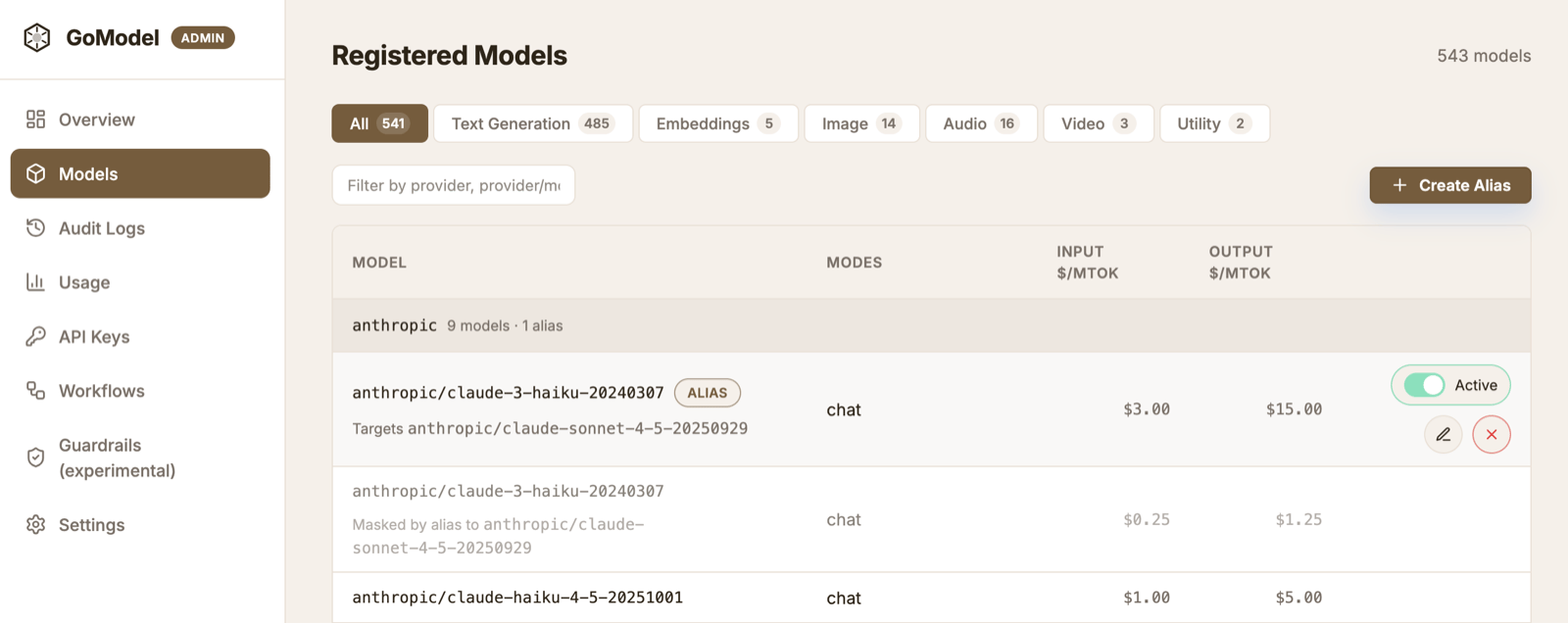
What virtual models do
A virtual model is a model you define, instead of one a provider advertises. GoModel picks the kind from whether you give it a target:- A redirect (an alias) is a stable name that points to a concrete provider
model. Your app sends the name in the
modelfield, and GoModel resolves it before sending the request upstream. - An access policy has no target. It gates an existing model selector by
user_path— or disables it entirely — without adding a new name. See User Path for access control.
Models -> New virtual model.
Fill Target model to make a redirect; leave it empty to make an access
policy on the Source selector.
GoModel does not persist empty, ineffective access policies, whether saved from
the dashboard or through the admin API. If a saved policy has no target, user
paths, description, slowdown, or reasoning effort and its enabled state matches the inherited/default
access state, GoModel removes the stored row. It retains an otherwise empty
policy when that row still overrides a disabled default or an inherited
user-path restriction.
Add artificial model latency
The Slowdown page is the full reference, including which endpoints are delayed. Set Slowdown on a concrete model or redirect to add a fraction of measured inference time. Active values range from0.1 to 10; for example, 0.5
adds 50%, so a response that takes 2 seconds upstream is returned after about
3 seconds. Set 0 to explicitly disable slowdown, including slowdown inherited
from a concrete model. Leaving the field empty leaves the setting unspecified.
Delays honor request cancellation.
For streamed responses — Chat Completions and Responses API SSE, and the
audio endpoints — GoModel drains the upstream in
the background and releases each read chunk on the scaled timeline. This
preserves the provider’s relative chunk timing while delayed chunks accumulate
in memory. A large factor on a long or high-volume stream, or on a large audio
response, can therefore use substantial memory; leave slowdown unset in
production, where it has no purpose. Realtime WebSocket sessions are not slowed.
When an alias and its concrete target both have a slowdown, the alias value
wins. An alias without its own value inherits the selected target model’s
slowdown; set the alias to 0 to override that inheritance. This also applies
to load-balanced virtual models after a target is selected.
A model’s own slowdown can be set exactly (openai/gpt-4o) or model-wide
(gpt-4o, on every provider), and the exact value wins. A more specific entry
that leaves slowdown empty, or whose user_paths exclude the caller, does not
hide a broader one, so a provider-wide access rule never turns a model’s
slowdown off.
Force a reasoning effort
Set Reasoning effort override on a concrete model or redirect to send that reasoning effort upstream, whatever the client asked for. Use it when a model accepts only some levels (for example a self-hosted model that rejectshigh)
or to pin cost and latency for a model. Values are none, minimal, low,
medium, high, xhigh, and max; leave it empty (the default) to keep the
client’s value.
reasoning.effort and the flat reasoning_effort
field, and applies even when the client sent no effort. GoModel then translates
it to each provider’s own reasoning parameter, as it does for client values.
The deepest configured value wins, per attempt. A concrete model’s override beats
any redirect above it, and an inner chained virtual
model beats an outer one. In the example above, team-model sends high to
openai/gpt-5.2 and medium to hetzner/qwen3.8, including when either is
reached through failover. When one model is reachable through several inner
virtual models, the path routing chose applies; a failover leg uses the first
declared path to its model. It applies to Chat Completions, the Responses API,
and the Anthropic Messages API; batches and provider passthrough are not
rewritten.
Because a concrete model’s override beats every alias above it, set it only for
levels the model cannot accept, and put policy on aliases. For example, fast
and smart aliases of the same model can send low and high; an override on
that model would make both send its value. This is the reverse of slowdown,
where the alias wins. As with slowdown, an exact override beats a model-wide
one, and an entry that sets no effort does not hide a broader one.
Set an effort per target
A virtual model with several targets can force a different effort on each one, so an application that only knows the virtual model’s name gets the right level whichever model serves it. In the dashboard, pick it in the dropdown next to each target; it appears once the virtual model has a second target, or when a target already has an effort set. Leave it on inherit (the default) to keep the virtual model’s own override, or the client’s value.reasoning_effort of the virtual model it belongs
to. Whatever the target names still wins: an override on the concrete model, or
on the chained virtual model the target points to.
Set request parameters
Set params and default_params on a redirect or a concrete model to send request parameters upstream.default_params fills in a key only when
the client omitted it; params replaces whatever the client sent, and a
null value strips the key from the request. Use defaults for sampling that
callers may tune and params for settings an alias must pin. Both are maps
in config.yaml, in the VIRTUAL_MODELS environment variable, in the admin
API, and in the dashboard editor. A policy row for a concrete model (an entry
without targets) accepts them too; provider-wide (openai/) and global (/)
rows reject them, as they do a reasoning effort override. A * source such as
openai/* is not a wildcard and is rejected for every policy.
Keys use OpenAI Chat Completions spelling (temperature, top_p,
max_tokens, presence_penalty, …). Provider-specific keys such as vLLM’s
top_k, min_p, repetition_penalty, and chat_template_kwargs pass
through unchanged. Provider adapters translate configured values exactly as
they translate client values: max_tokens still becomes
max_completion_tokens on OpenAI reasoning models and max_output_tokens on
the Responses API.
A token limit is one limit in any spelling: max_tokens,
max_completion_tokens, and max_output_tokens all set it. A value in
params replaces whichever spelling the client sent, and a value in
default_params applies only when the client sent none of them. Across
chained virtual models and policies the deeper row wins whichever spelling
either used.
One parameter set serves every API, so the keys listed here are skipped on
the API that lacks them, and the token limit is mapped as described above.
Every other key reaches the provider adapter unchanged and is handled like a
client’s: the adapter may drop a key it does not translate (the Anthropic
adapter drops top_k), and the upstream may reject one. On the Responses API,
the Chat-only keys seed, stop, n, frequency_penalty,
presence_penalty, logit_bias, logprobs, modalities, audio,
prediction, web_search_options, response_format, and verbosity are
skipped (a forced null still removes the client’s value); to set an output format or verbosity there, configure text, for
example {"format": {"type": "json_object"}}. On Chat Completions, the
Responses-only keys text, include, truncation, max_tool_calls,
background, and context_management are skipped.
For example, several aliases of one self-hosted model with different thinking
and sampling settings:
default_params, then
params, then the reasoning effort override,
which stays a separate typed field. Objects merge one level deep, so a
client’s own chat_template_kwargs keeps the members the alias does not set;
scalars and arrays replace. model, provider, messages, input,
instructions, tools, stream, stream_options, reasoning,
reasoning_effort, previous_response_id, conversation, and prompt
cannot be configured, and a key cannot appear in both maps of one row. Values
are validated when saved (temperature and top_p must be numbers,
max_tokens a non-negative integer, and so on); each map allows up to 64 keys
and 16 KiB.
Precedence across rows is per key and follows the reasoning effort rule: a
concrete model’s policy beats any redirect above it, and an inner
chained virtual model beats an outer one. The deeper
row also decides whether a key is forced or a default: a concrete model’s
default_params.temperature turns an alias’s forced temperature back into a
default. A failover leg is rebuilt from the client’s request and gets the
parameters of its own route and concrete model; the primary model’s policy
never leaks into it.
Guardrail plugins run first, so params replaces a
value a plugin set and default_params respects it. Parameters apply to Chat
Completions, the Responses API, and the Anthropic Messages API (native
Messages passthrough takes the translated path when parameters apply);
batches, provider passthrough under /p/, embeddings, and media endpoints
are not rewritten. The exact cache key is built from the
applied request, so two aliases of one model share an exact entry only when
they send the same request upstream. The semantic cache key covers the applied
request parameters as well (see
what the semantic cache keys on
for exactly which fields), so aliases that apply different values, including
top_k or chat_template_kwargs, never share a semantic entry either.
The rest of this page covers redirects.
Use stable names
You can expose names likeregular and smarter instead of provider-specific
model IDs.
regular->anthropic/claude-sonnet-4-6smarter->anthropic/claude-opus-4-6
Load balance across models
A redirect can point at several target models and spread requests across them. Add more than one target in the editor (Add target) and pick a strategy:- Round-robin (default) rotates requests evenly across the targets. Set a
per-target weight to bias the share — a target with weight
2receives twice the traffic of a target with weight1. - Lowest cost routes every request to the cheapest currently-available target, ranked by the model registry’s input + output per-token price. When a target has no registry pricing it is skipped while a priced target exists; if none are priced, the first listed target is used.
- Failover always routes to the first currently-available target in the order listed: the targets form a priority list, and lower entries serve only while every entry above them is unavailable or fails. Weights and session keeping do not apply.
- Adaptive (GoModel Pro) picks the target with the best observed latency, error rate, and price, backs off rate-limited or failing targets, and keeps a session on the provider whose prompt cache is warm. See Intelligent Routing. On an open-source build the strategy falls back to round-robin.
- Plugin (
strategy: plugin) delegates the choice to a loaded routing strategy plugin named bystrategy_plugin, configured per redirect throughstrategy_config. The built-incheapest_healthyprefers the cheapest (or fastest) target whose recent error rate is acceptable. Weights do not apply; if the plugin fails or is missing, the redirect falls back to weighted round-robin.
user_path may not use: every strategy routes around it,
so disabling a model (for example while its provider’s quota is exhausted)
moves its traffic to the other targets until you re-enable it. When every
available target is disabled or denied, the request fails with
model_access_denied; when no target is available at all (unknown model,
provider down), the name is resolved like any other model name, usually
ending in a model-not-found error. A request that names a disabled model
directly still fails.
A redirect with a single target behaves exactly like a plain alias.
Whatever the strategy, the remaining targets are the redirect’s failover
chain: when the chosen target fails with a retryable error, the request is
retried against the other available targets in the order listed. The editor’s
Failover checkbox (on by default; failover: false as code) switches that
off for one redirect, so a failed request is answered with the error instead;
it can also be switched off globally or by the request’s workflow. See
Failover for the errors that trigger a retry and for
adding a failover chain to a real model by shadowing it.
Requests belonging to one detected client session stick to the target that
served the session first (Session keeping, on by default), so
conversations keep their provider prompt cache warm across turns. Untick the
editor’s Session keeping checkbox (or set session_affinity: false) to
restore stateless balancing — see
Session Keeping.
smart at both openai/gpt-4o and anthropic/claude-sonnet-4-6
with the round-robin strategy to split load, or at a premium and a budget model
with the cost strategy to always take the cheaper one.
Reorder targets
The target list is an ordered list, and the editor keeps it editable: drag the grip handle (☰) at the left edge of each target row onto another row to change its position. The drop row is not replaced — the dragged row moves into its position and the rows in between shift. Keyboard users can focus the handle and press ArrowUp / ArrowDown for the same move. The handle shows only when the redirect has more than one target, and every strategy benefits: for failover the order is the priority chain (position1 is tried first), for the balancing strategies position 1 is the first
slot in the queue. Weights and explicit provider pins stay attached to their
target when it moves.
Chain virtual models
A redirect target can name another virtual model instead of a concrete model. The inner virtual model is resolved at request time, so its targets, weights, and strategy are defined once and reused everywhere it is referenced — no duplicated target lists that drift apart.- The cost strategy prices a chained leg at the cheapest concrete model currently available behind it.
- A chained virtual model that is disabled, or has no available target, is skipped like an unavailable provider model.
- Only the outer virtual model’s
user_pathsandslowdownapply to a request; the inner one’s scope is not consulted when it is reached through a chain. /v1/modelslists a chained redirect with the metadata of its first available concrete model.
config.yaml, the dashboard, or the admin API — so team/cheap reaches the
virtual model of that name even though it looks like provider/model. Set
provider explicitly ({ provider: groq, model: llama-3.3-70b }) to pin a
target to a concrete model regardless of any virtual model sharing the name.
A redirect that shadows a real model and lists that model
among its own targets (the shape the Models page creates when you add
fallbacks or balancing to a model) covers the model rather than replacing it.
An alias or any other redirect that names the model chains into that cover, so
it gets the same balancing and failover a direct request gets — with one
exception: the fallback reference of one such cover to another covered model
reaches the model itself, not the other cover’s fallback list. That is what
lets two models protect each other without forming a cycle, and keeps a
fallback from sweeping the fallbacks of the fallback. Because a bare
reference to a covered model names the model rather than the cover, the cover
can be deleted while such references exist — they simply revert to the
concrete model. A shadow that does not list its source replaces the model
and is chained through like any other virtual model: references chain into
its targets, and it cannot be deleted or renamed until they are repointed.
Chains must be acyclic (a -> b -> a is rejected, with the cycle spelled out)
and at most 8 virtual models deep. Both rules are enforced when saving from the
dashboard and at startup for declarative entries. A target must exist when it is
saved — create the inner virtual model first — and a virtual model that others
chain through cannot be deleted or renamed until they are repointed.
Rename or repoint a redirect
Open a redirect in the dashboard and edit its Source to rename it. GoModel moves the definition to the new name in one step — the old name stops resolving, so update any app still sending it. Renaming onto a name that already belongs to another virtual model is rejected; renaming onto a concrete model name shadows that model (see Shadow a model). Redirects that shadow a model by its full name can be edited the same way — use the model row’s Edit redirect action. Other redirects are edited from their own row. Virtual models declared as code keep theirsource
fixed in configuration; rename them by editing the declaration.
Define virtual models as code
Operators who manage configuration as infrastructure-as-code can declare virtual models inconfig.yaml or the VIRTUAL_MODELS environment variable instead of
the dashboard. Declarative entries are applied at startup, override any
admin-store row with the same source, and are shown read-only in the dashboard
(a Config badge). Edit the configuration to change them.
In config.yaml:
config.yaml entries with a matching source:
source, a single target (shorthand) or a targets list,
strategy (round_robin, cost, or failover), session_affinity (default true; see
Session Keeping), failover (default true; see
Failover), user_paths, description,
slowdown (0 disables inherited slowdown; active factors range from 0.1 to
10), reasoning_effort (see Force a reasoning effort),
params and default_params (see
Set request parameters), and enabled.
A target has model and optional provider, weight, and reasoning_effort
(see Set an effort per target). Its model may
name another declared virtual model (see
Chain virtual models).
Leave the targets empty to declare an access policy on the source selector. An
invalid declaration (unknown strategy, missing or self-referential target, a
chain cycle or a chain deeper than 8 virtual models, or a target provider that
matches no configured provider — a typo) fails startup with a clear error
listing the registered provider names.
Two lenient exceptions keep valid setups booting:
- A target
providerthat is declared underproviders:but did not register — typically because its credentials are unset in this environment — only logs a warning; the target stays unavailable until the credentials resolve. Aconfig.yamlshared across environments still boots everywhere. - Whether a target model exists is never checked at startup: the model catalog loads asynchronously, so availability is a runtime concern and an unavailable target is simply skipped at resolve time.
Model availability by default
Every provider model is available unless avirtual_models entry says
otherwise. To flip that default, set:
targets is enough — it acts as a pure
access rule (enabled: true, optionally with user_paths). Unavailable
models fail requests with 400 model_access_denied and stay out of
GET /v1/models. A redirect resolves by its own enabled flag, but its
target is validated like a direct call: with the default off, give the
target model its own access entry too. When that target is also the source
of another redirect, use a provider-wide or model-wide policy instead: an
access entry at that source replaces a dashboard-managed redirect there.
This is not the reverse of exposing only redirects:
that setting only changes what GET /v1/models lists, while the availability
default decides which models requests may call at all.
Expose only redirects
To hide provider models fromGET /v1/models, set:
/v1/models
instead of the full provider model list. The setting is also listed in
.env.template.
List bare model IDs
By defaultGET /v1/models returns provider-qualified IDs such as
openai/gpt-5. Some clients validate the model you configure against that list
and only know plain names, so they never match. To list bare IDs instead, set:
owned_by field still carries the provider name. Requests for a bare model
ID keep working the same way in both modes.
Caveat: when two providers expose the same model ID (for example gpt-5 on both
openai and azure), only the provider an unqualified request routes to (the
first registered one) is listed. To pin a name to a specific provider, add a
virtual model with that name as its source:
Shadow a model
A redirect can “shadow” a model by using the same name as an existing model and pointing it somewhere else. This lets you override a requested model without changing application code. For example:- source:
anthropic/claude-opus-4-6 - target model:
anthropic/claude-sonnet-4-6
anthropic/claude-opus-4-6, while GoModel routes the
request to anthropic/claude-sonnet-4-6.
A redirect matches the requested name exactly, including case. In the
dashboard, a redirect whose source is a model’s full name (the name shown on its
row, such as openrouter/qwen/qwen3-vl-8b-instruct) appears on that model’s row
while it is enabled and valid. Any other redirect, including one named after the
bare upstream ID (qwen/qwen3-vl-8b-instruct), gets its own row under
Virtual models, and requests for the model’s full name still go to the model.
With a category selected, that row is shown only when one of the redirect’s
targets is in the category; All always shows it.
A/B testing
Redirects are useful for short model experiments. Move a redirect from one target to another, then compare app behavior, latency, and usage. For example, pointsmarter at Opus for one test and Sonnet for another. You can
also shadow opus-4-6 with sonnet-4-6 to check whether the same app flow still
works.