

How costs are estimated
For each request GoModel prices:- Input and output tokens at the model’s per-million-token (MTok) rates.
- Cached input, reasoning, and audio tokens at their own rates when the provider reports them, so cache-heavy and reasoning-heavy traffic is priced correctly.
- Non-token units where that is how the provider bills: generated images (
per_image/output_image_per_mtok), audio duration (per_second_input,per_second_output), and speech characters (per_character_input). See images and audio for which unit applies to which model — where a rate and a token rate are two expressions of the same charge (an image’s generated tokens, an audio clip’s duration), only one of them is applied.
cost_in_usd_ticks), GoModel uses that value instead of catalog pricing. Each row records which method was used in its cost_source field: model_pricing, openrouter_credits, or xai_cost_in_usd_ticks.
Cached tokens are discounted only when the model’s pricing includes a
cached_input_per_mtok rate. Without it, they are priced at the full input rate.reasoning_output_per_mtok when the model has one. In openai_compatible mode Google leaves them out of completion_tokens, so GoModel adds them back before pricing and the recorded cost rises to include thinking. When the response does not itemise reasoning tokens, the whole part of total_tokens beyond prompt and completion tokens is recorded as reasoning tokens and priced at the output rate, or at reasoning_output_per_mtok when the model has one; it can include prompt tokens of Google’s built-in tools. When it does itemise them, at most the itemised count is added, and no more reasoning tokens are recorded than output tokens. See Gemini.
Anthropic bills cache writes by TTL: the default 5-minute writes at cache_write_per_mtok and 1-hour writes ("ttl": "1h") at cache_write_1h_per_mtok. GoModel prices each share at its own rate from the usage.cache_creation split. Without a cache_write_1h_per_mtok rate, 1-hour writes are priced at cache_write_per_mtok.
Time-of-day pricing
Some providers charge different rates depending on when a request runs. DeepSeek, for example, bills its off-peak hours at half the peak rates and treats weekends as off-peak. The catalog publishes the standard (peak) rates as a model’s base prices and lists the discounted periods underpricing.time_windows:
start inclusive, end exclusive); an end at or before start wraps past midnight, and days limits a range to weekdays (all days when omitted). Rates absent from a window keep their base price, and outside every window the base prices apply. Recalculating stored costs uses each row’s stored timestamp, so historical rows are re-priced for the window they actually fell in. The dashboard’s cached-input cost estimate applies windows per minute of the week, matching the precision of the window bounds.
On the Models page, a * next to a price marks a model with time windows; hover it to see the schedule and rates. Overriding a base rate (input, output, cached input, or cache write) replaces the catalog’s discount for that rate as well: the override becomes the price at every hour. config.yaml model metadata may also declare its own time_windows, which replace the catalog’s.
Time windows are recurring UTC schedules only. Rules the catalog cannot
express — a provider’s holidays, or promotions with a fixed end date — are
not applied.
Where pricing comes from
Pricing for a model is resolved in priority order:- Operator overrides set in the dashboard.
config.yamlproviders.<name>.modelsmetadata.- The model catalog, sourced from the
ai-model-listregistry.
ai-model-list and contribute a correction there, or set an override for an immediate fix.
Pricing is one part of a wider metadata pipeline that also resolves context windows, capabilities, and model categories — see Model metadata for the full source chain.
Override pricing
Override pricing when the catalog price is wrong, missing, or differs from your negotiated rate. Open the Models page, find the model, and open its Pricing override editor. Set one or more price types (input, output, cached input, and so on) in USD. Saved fields override catalog andconfig.yaml pricing for that selector; unset fields keep inheriting.
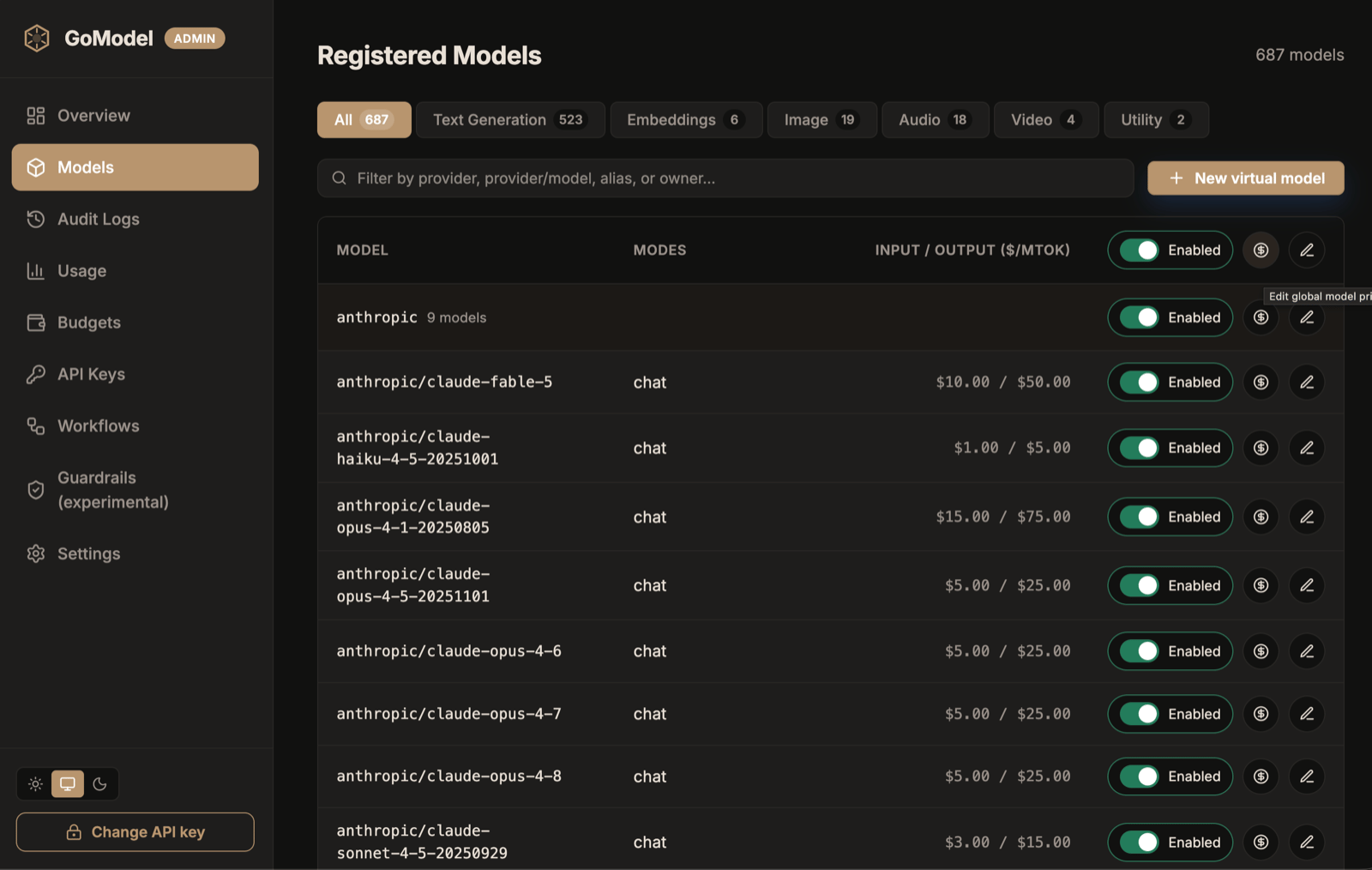
The Models page lists each model's prices; the $ action opens its pricing override
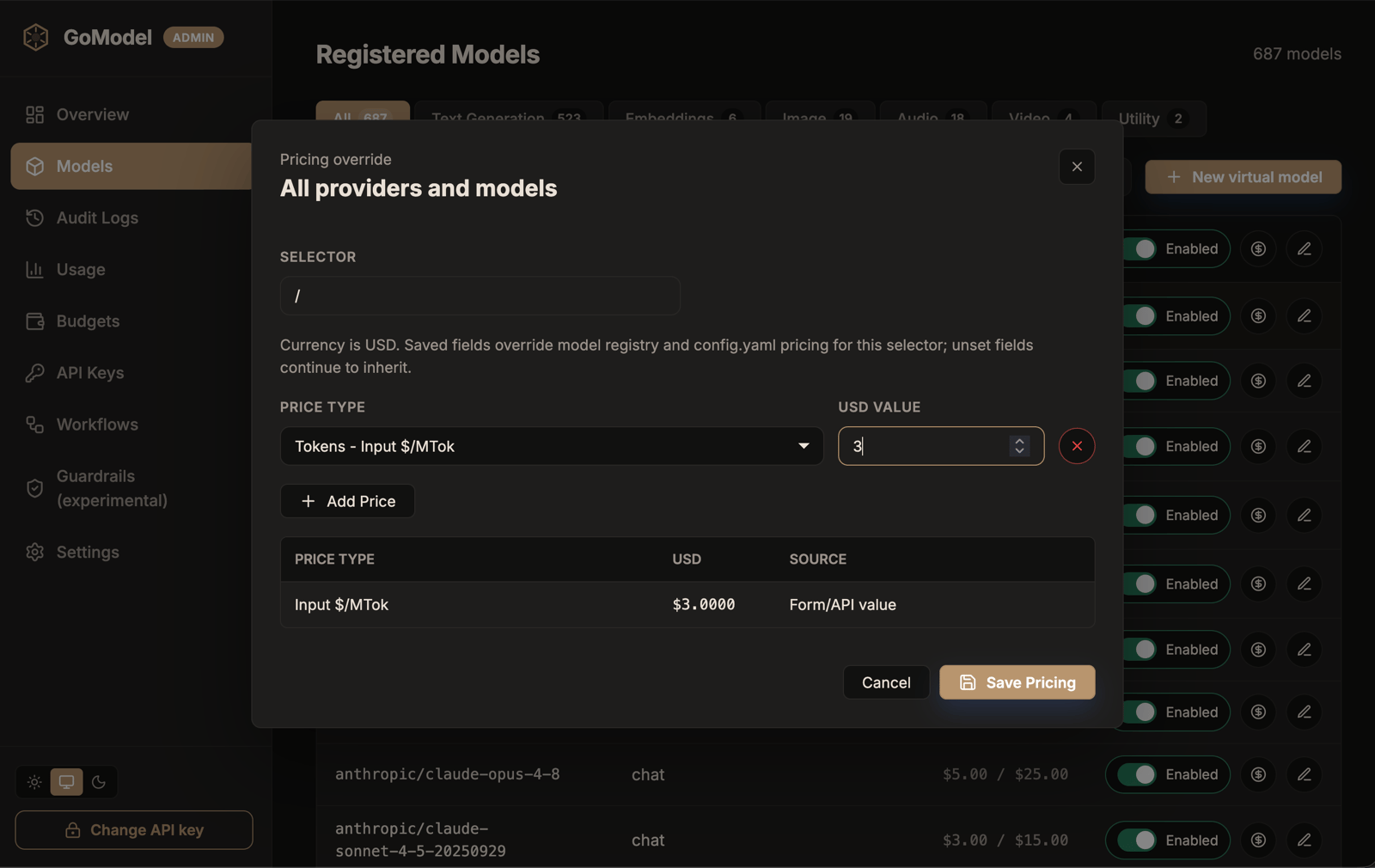
Set a price type and USD value; saved fields override catalog and config.yaml pricing for the selector
Markups and billed cost
Add a markup when you resell model access, for example to recharge customers for the tokens they use. GoModel records each request’s billed cost (billed_cost on the usage row): the provider cost plus the markup. The provider cost itself never changes, so budgets, dashboard totals, and savings keep measuring what you pay upstream. With GoModel Pro, a budget can limit billed cost instead; see Budgets on billed cost.
Markups are off by default. Turn them on with markups_enabled: true (env PRICING_MARKUPS_ENABLED=true), then set percentages in config.yaml. With markups on but no rule matching a request, its billed cost equals its provider cost. With markups off, GoModel records no billed cost and ignores markups and bill_cache_hits, logging a warning at startup if markups is set.
providers), and an unknown provider fails startup. A 20% markup bills $1.20 for $1.00 of provider cost: a 16.7% margin.
bill_cache_hits decides how responses served from GoModel’s response cache are billed. true bills each hit at what the same call would cost when the hit is served — current pricing and time-of-day rates — plus markup; false bills them at $0, even when their cost is unknown. Provider prompt caching (cached input tokens) is a real provider cost and is always billed.
Each usage row also stores the markup it was billed at (markup_percent, markup_selector), so changing markups never rewrites past bills.
A provider configured with billable: false (providers.<name>.billable in config.yaml, <PROVIDER>[_SUFFIX]_BILLABLE=false, or the Billable checkbox on the Providers page) serves requests whose cost the caller does not owe you, typically a customer’s own API key registered as its own provider instance. Its usage is still tracked and priced, so the estimate stays visible whenever the model has a price, and each row records billable: false. With markups enabled, such a row is billed at 0 with no markup rule applied, so the Billed column, billed budgets, and the invoice export never charge a customer for their own key: an invoice line for such a provider shows the provider cost with a billed cost of 0. A response-cache hit of that provider’s model is billed at 0 too, and recalculating stored costs keeps these rows at 0. With markups disabled, no row records a billed cost, non-billable ones included. The flag is stamped when the row is written, like the markup, so changing it later does not rewrite past bills. User-path and label budgets skip non-billable usage whether or not markups are enabled; see Budgets.
Once markups are enabled, the dashboard shows billed cost next to provider cost: a Billed card on the overview and usage pages, a column in every usage breakdown (model, user path, label, request type or endpoint, and session), and a column in the request log whose tooltip names the markup each row was billed at. The admin API reports it as total_billed_cost on /admin/usage/summary, billed_cost on /admin/usage/daily, /admin/usage/models, /admin/usage/user-paths, /admin/usage/labels, /admin/usage/endpoints, and /admin/usage/sessions, and billed_cost, markup_percent, and markup_selector on /admin/usage/log entries. A day billed only for cache hits still appears in /admin/usage/daily, with zero requests. Billed totals include billed cache hits even though the other cost figures exclude them, so per-user-path billed cost is what to charge each customer.
Per-customer markups (GoModel Pro)
Per-customer markups are available in GoModel Pro and require the
billing license entitlement. Without it, user_path_markups with
markups enabled aborts startup — GoModel never silently bills a customer at
the global rate.user_path_markups. Each path takes the same selectors as markups:
/acme covers /acme/team, not /acmecorp) and applies the most specific selector in it, in the usual order. When that path has no matching selector, it tries the next shallower path, then markups. Markups never stack. With the example above, /acme/internal/ci is billed at 0%, /acme/team at 15% for openai/gpt-5 and 30% for everything else, and /beta at 20%.
The default is none: without user_path_markups, markups applies to everyone. With markups_enabled: false, user_path_markups is ignored like markups, and GoModel logs a warning at startup. A rule from user_path_markups is recorded in markup_selector as <user path>:<selector>, for example /acme:openai/gpt-5, so the request log shows which customer rule was billed. User paths are normalized as on requests, so acme/ and /acme are the same key; / is rejected, since markups already covers it.
Dashboard totals
- Estimated Cost — spend on live provider requests; cache hits are excluded.
- Saved Cost — what requests served from the cache would otherwise have cost.
- Billed — shown when markups are enabled: provider cost plus markup, including billed cache hits.
--- value means the cost is unknown because no pricing was available, which is not the same as $0.
Filter and break down spend
The usage page filters every card, chart, and the request log by model, provider, label, API key, endpoint, user path, and session. Each dropdown takes several values: a request matches a filter when it has any of the selected values, and it must match every filter. The user path picker lists known paths as a tree grouped by prefix; picking a node includes everything below it, and you can type a path that is not listed. By default, the API key filter hides deactivated and expired keys, and the user path filter hides paths that have neither a policy nor an active API key. Turn on Show inactive keys or Show inactive paths next to the filter to list them, for example to look at a former customer’s history. A selected value always stays listed. When the list of users is unavailable, the user path filter shows every path. The Breakdown section pivots the filtered usage by two dimensions. For example, rows User path, columns Period and period Monthly show cost per month per user path. Pick the metric (cost, tokens, or requests); the top 10 rows and columns are kept and the rest fold into Other. User path grouping folds paths by their first segments, so/team/alice/laptop counts under /team/alice. Switch between the stacked chart and the table, and use Download CSV to export the table with its totals.
Filters, the date range, and the breakdown settings are kept in the page URL, so a copied link opens the same view. The same data is available from GET /admin/usage/breakdown, and the filters from every usage endpoint except /admin/usage/throughput (see Multi-value filters).
Recalculate stored costs
Recalculating recomputes the stored cost of matching usage rows from current pricing. Use it after changing an override, or when pricing was unavailable at the time a request ran. The action is enabled by default (USAGE_PRICING_RECALCULATION_ENABLED); on the usage view, choose Recalculate, then type recalculate to confirm. It is scoped to the selected date range, provider or model, and user path.
Recalculation reprices billed cost with the markup each row was billed at, and bills cache hits according to the current bill_cache_hits. Rows recorded before markups existed are billed at their provider cost. While markups are disabled, recalculation leaves billed cost unchanged.
Cost per active user (benchmark)
The benchmark answers “what does an active developer cost per month, and how is that spread?”.GET /admin/usage/benchmark treats each direct child of parent as one user and sums its whole subtree, the same way the invoice export and per-child budgets group paths: with parent=/eng, /eng/alice/laptop and /eng/alice/ci both count as /eng/alice. It needs no Pro license.
On the usage page, the Cost per active user section below Breakdown shows the same data: pick the group and the number of months, then switch between a chart of the median and p90 cost per active user with the number of active users, and a table of the monthly statistics. It follows the page’s filters but not its date range, and offers up to 12 months. With markups enabled, a toggle switches between provider and billed cost. The current month is marked as in progress rather than compared with the previous one, users with missing pricing are counted in a Pricing gaps column, and cost recorded on the group itself is shown with a note.
By default the response names no user paths: it returns per-month counts,
totals, and statistics only. Per-user rows (
top_users: [{user, requests, cost}]) appear only when you set top_users. The statistics are not
anonymized: in a month with one active user, mean, p50, p90, and max
are that user’s exact cost, and with few users they come close to it.model, provider, label, endpoint, operation, session_id, auth_key_id, and user_path. The date window of the other usage endpoints (start_date, end_date, days) is ignored and not validated: the range comes from months, start_month, and end_month. cache_mode is fixed, as on the invoice: requests and provider cost come from requests sent to providers, while a response-cache hit makes its user active and adds its billed charge to billed cost, but costs the provider nothing.
months lists every month in the range, oldest first, including months without usage. Per month:
active_users— users with at least one request in the month; response-cache hits count.total_cost— the month’s total: the USD cost of all its active users together. It is0, notnull, in a month without active users.mean,p50(median),p90, andmax— USD cost per active user;nullin a month without active users. Each user’s cost is the one the invoice export reports for that customer over the same month, on the chosencost_basis.mean_change_percentandp50_change_percent— change from the previous month;nullfor the first month, for the partial current month, for a month without active users, or when the previous month’s value is not positive.unpriced_users— active users whose whole month cost is unknown because their models have no pricing. They count at cost0. The invoice showsnullfor them, or leaves them out when their only usage is billed response-cache hits of unknown cost.partly_priced_users— active users with some unpriced usage; onbilledcost that includes billed response-cache hits of unknown cost. They count at their known cost, sototal_costand the statistics understate the month when it is not0.unattributed_cost— usage recorded onparentitself. It belongs to no user and is not part oftotal_cost.partial—truefor the current month, which is still running; it has no change percentages.top_users[].requests— requests sent to providers, as on the invoice; response-cache hits are not counted.
PERCENTILE.INC, NumPy’s default, and PostgreSQL’s percentile_cont: for n sorted costs, the p-th percentile sits at 0-based rank (n−1)·p, between its two neighbours. Two users costing $10 and $20 give a p50 of $15 and a `p90` of $19; a single user is every statistic. SQLite, PostgreSQL, and MongoDB return the same figures.
Months run midnight to midnight in the zone of the X-GoModel-Timezone header, as on the invoice export: the dashboard sends its configured zone, and an API call without the header uses UTC. time_zone reports the zone used.
Every user is counted: unlike the breakdown, nothing folds into Other. A range covers at most 12 months, the current one included, in line with the 365-day limit of the other usage endpoints, and is checked before anything is read. One benchmark holds at most 100,000 user months (users × months); the read stops with 400 as soon as it passes that, rather than leave users out. Pick a deeper parent, fewer months, or narrower filters. parent names one group; repeating it returns 400. A scoped credential can benchmark only groups inside its subtree; any other parent returns 403 user_path_out_of_scope.
Invoice export (GoModel Pro)
Invoice export requires a GoModel Pro license with the
billing
entitlement, and markups enabled (PRICING_MARKUPS_ENABLED=true). Without
the entitlement the endpoint returns 403 invoice_export_not_entitled;
with markups off it returns 409 markups_disabled.GET /admin/usage/invoice exports billed usage for a period, one block per customer. Each customer is a user path; with parent, each direct child of that path is one customer, the same way per-child budgets meter them, so parent=/customers bills /customers/acme/app1 and /customers/acme/app2 together under /customers/acme. Usage recorded on the parent itself stays under the parent. Without parent, every user path is its own customer.
It takes the same date range and filters as the other usage endpoints, plus format=csv (default, downloaded as gomodel-invoice-<start>-to-<end>.csv) or format=json. On the usage page, Export invoice downloads the CSV for the selected date range and filters.
The period’s days run midnight to midnight in the time zone of the X-GoModel-Timezone header, which the dashboard sets to the zone chosen in its settings, or the browser’s zone by default; an API call without it uses UTC. Every export reports its zone in time_zone, and a file exported in another zone than UTC carries it in its name (gomodel-invoice-2026-10-01-to-2026-10-31-America-Los_Angeles.csv). Bill from one zone: the same dates in two zones cover different hours, so when consecutive invoices mix zones, usage near a month boundary lands on two invoices or on none.
row_type tells line items from each customer’s subtotal and the grand total, so filter on item before summing in a spreadsheet. Amounts are plain USD decimals; an empty cost means it is unknown (no pricing). Requests, tokens, and provider cost cover requests sent to providers; billed cost also includes billed response-cache hits, as in the other billed views, so a line made only of cache hits shows a provider cost of 0. effective_markup_percent is billed cost over provider cost, minus one, so billed cache hits raise it on a line with a provider cost; a line of cache hits alone has none.